
The cLAN has a basic serial console that allows you to set the configuration to factory default values or to change the password in case you've forgotten the original one.
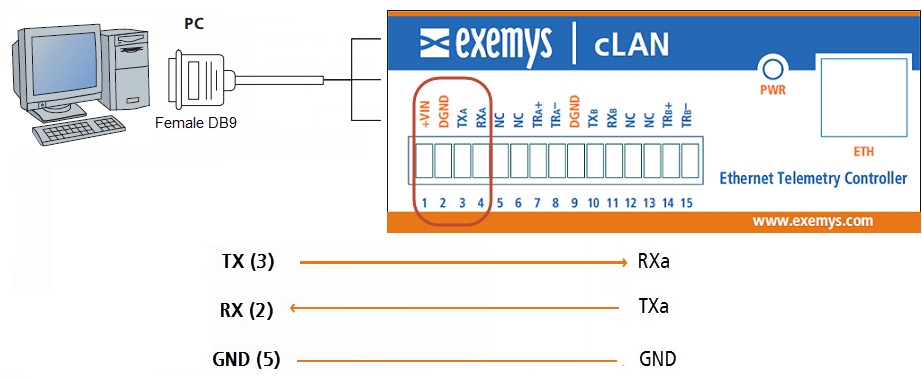
To enter the command mode you must connect your computer to the cLAN using a RS232 cable using serial terminal software (Like Hyperterminal) . We suggest you to use Exemys terminal software that you can download from this link http://www.exemys.com/console
Open the terminal software and select the correct COM port. Check the baud rate is configured at 9600 bps.

Power the device, and press the CFG button until you see a welcome message. You must do it within the first 7 seconds after powering the device on.
Welcome to the command console
>
Once you enter the command mode you can use these commands.
Command |
Description |
FACTRESET |
Reset the device to factory defaults |
PASSWORD:xxxx |
Change the password |
END |
Close the console and reset the device |
The RS232 cable must be assembled like this.
cLAN terminal block |
DB9-H connector |
TXa |
2 |
TXa |
3 |
DGND |
5 |
To set to set the password to "exemys" you must this on the console.
PASSWORD:exemys
You will receive a message acknowledging the command
Then type END to finish.
2017-12-12