Remote serial port with Redirector (Virtual COM port)
Principles of Operation
This Redirector allows transparent communication with equipment located in remote places, simulating a serial COM port.
Exemys recommends to use Serial/IP COM port rediector from Tactical Software. To download a 30 day free trial license or to buy a license please contact us at sales@exemys.com
Use the following items:
- GRD/cLAN: converts a RS-232/485/422 Communication to TCP/IP (over GPRS on the GRD)
- Middleware: provides connectivity with GRD equipment, allows the establishment of access policies and provides tools for monitoring of equipment.
- Serial Port Redirector: simulates a virtual serial port that we will be able to use to communicate with the remote equipment as if we were connected locally. It also provides the necessary interface to configure the connection with the MW, select the remote equipment with which we want to communicate and also monitor the status of the connection.
In this manner, a serial communication could be replaced by the following scheme:
Configuration
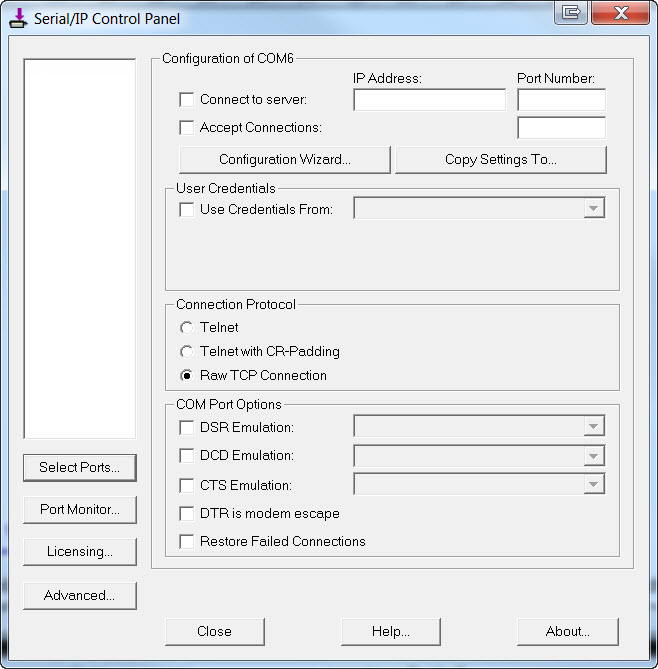
To open the Configuration Windows click with the right button on the icon and select “Configure”. The first time you enter, the screen to be displayed will be the following:
Select the virtual port
In the configuration screen, press the “Select Ports... ” button. A screen will be displayed with a list of all virtual COMs from which you will be able to choose from. The Redirector discards from this list the reserved ports. Select the desired virtual port and press “OK”.
Once the port to be used is selected, the configuration screen will let you configure the rest of the configuration parameters.
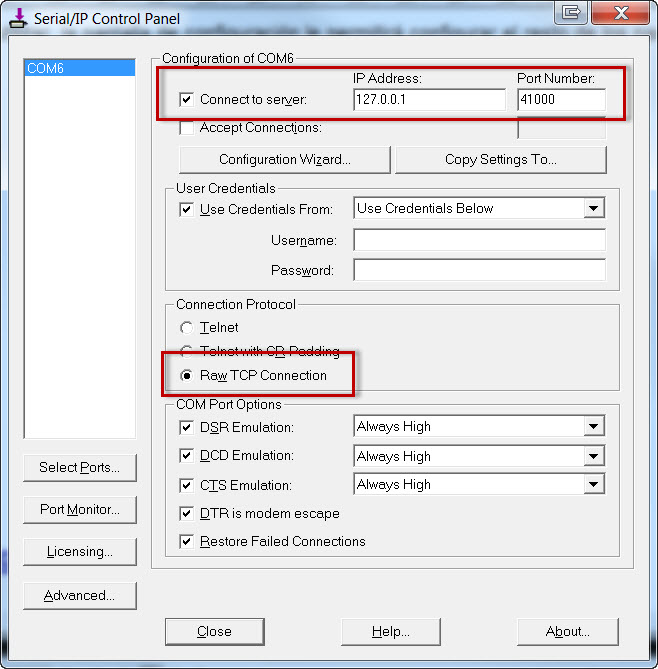
Configuration of the connection with the MW
If you connect the GRD/cLAN to the Exemys Telemetry Server the IP address, port number, user and password will be provided by Exemys
IP address
It is the IP address of the Server where the transparent MW is running. If a URL is entered instead of an IP address the Redirector will attempt to resolve it.
An existing established connection will not be affected by the changes, they will be applied the next time the virtual port is open.
Port
It is the port of the remote server where the transparent MW is running the Transparent Serial server service. The default port is 41000.
If an established connection already exists it will not be affected by the changes, these will apply the next time the virtual port is opened.
Username and password
To connect with the GRD/cLAN, you must have a user name and password so the MW can allow to access them. The parameters must be the same ones that were configured in the MW in “Transparent” mode.
In the "Username" box type the User followed by a comma an the device's ID number.
Testing the connection with the MW
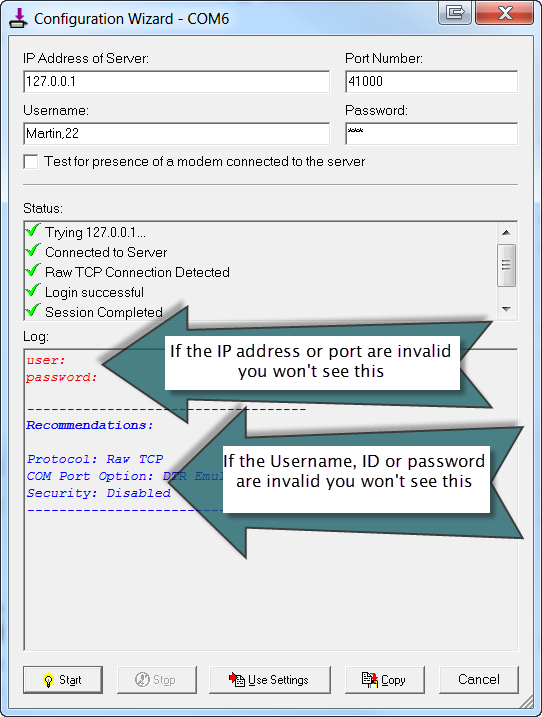
Once the configuration is completed you can test it pressing the "Configuration Wizard..." button and then the "Start" button. You should see something like this is the configuration is OK.
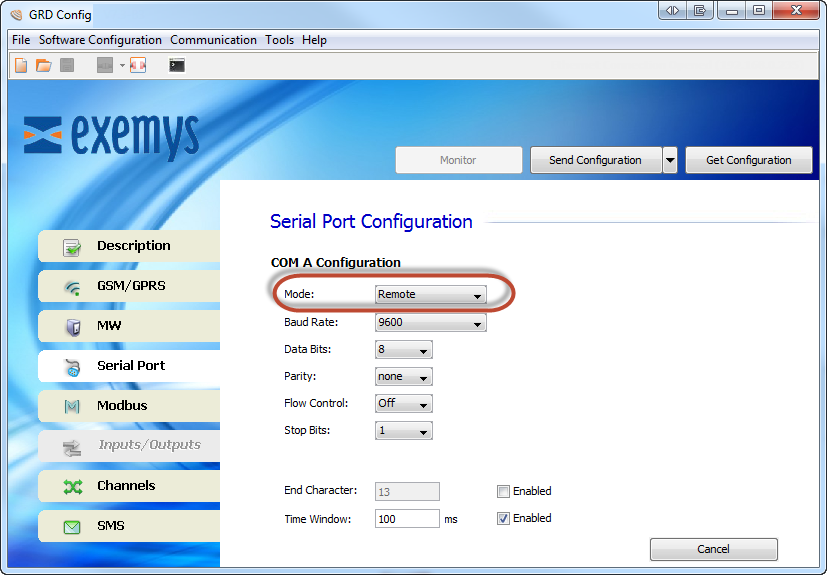
GRD/cLAN serial port configuration
To access the GRD/cLAN serial port remotely configure it in "Remote" mode
Activity and data monitor
With the right button click on the icon, select “Port Monitor ”.
With this screen you are able to follow in real time, the status of the connection of the Redirector.
Read the Serial/IP user's manual for more details.
Multiple COM ports and Serial/IP licencing
The Serial/IP redirector requieres a license to work. You can use it for free for 30 days to test it.
The one port license won't limit how many COM ports you can configure, but you will be able only to open one COM port at a time.
If the software you are using doesn't allow you to create multiple COM ports, you can configure Serial/IP to create a list of devices on a single COM port without having to edit the cLAN/GRD ID number. Please read the section "Configuration Presets" in the Serial/IP user's manual for more details. If you need help to configure this feature contact us at support@exemys.com
2017-06-16