
The purpose of this manual is to provide the instructions to quickly and easily install and operate the GRD equipment (3G/4G models)
The installation of the GRD also implies the installation of middleware and eventually any other application depending on the intended use for the system.
The GRD has multiple uses. These are the most common uses that will guide you to read this manual.
There are hundreds of types of sensors that can be contacted directly to the GRD inputs to measure different types of variables. Depending on the GRD model, sensors could be used to deliver signals in 0-10V, 4-20mA or pulses, or simply connect different devices to their inputs/outputs. The GRD can also be configured as Modbus master and queries can be made to different slaves to expand its inputs/outputs.
The GRD works as a GPRS datalogger, creating records with timestamp with the value of the built-in or external I/Os and sending them to the Middleware (MW)
The MW will forward all the incomming records to an external database (MySQL or MS SQL)
You can also create a WEB site to show the value. Or you can use Exemys Telemetry service to connect your GRD to our MW and web site (www.exemys.com/m2mserver)
The GRD can also be used to do a local control over its inputs/outputs using the script programming feature.
Note: The WEB server and the database engine are not provided by Exemys. You can use Apache HTTP Server and MySQL. Both of them are free tools.
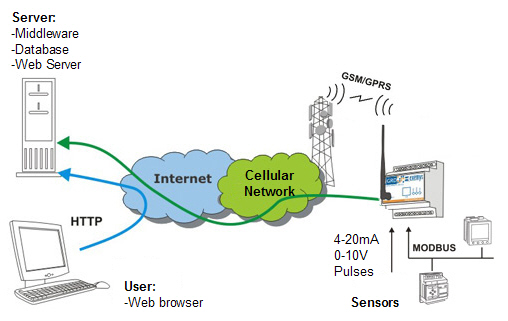
For this type of solution the following procedure must be followed:
GRD I/Os can be read remotely from any Modbus master software (SCADA, OPC server, etc). The Modbus master will read the MW's Internal Modbus slave. It will answer back with the value of all GRD's I/Os. The master can establish the link using Modbus TCP, Modbus RTU or Modbus ASCII over TCP. To optimize the GPRS network use the GRD will update the value of its inputs sending "reports" only when they change.
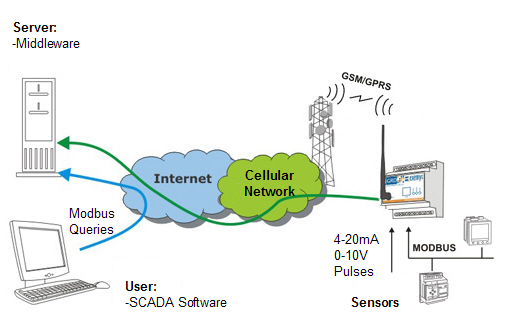
For this type of solution the procedure below must be followed:
This solution allows you to remotely access the GRD's serial port as if it were physically connected to the serial port of our computer.
You can think of it as an alternative to the telephone modems but with several advantages.
There are two way to do it:
To access the remote serial port you must install the “Redirector of serial port” software. This software creates a virtual serial port that lets you use an existing software and connect to the remote equipment as if it were connected in a physical serial port of the computer.
Middleware is here only a link between the Redirector of serial port and the GRD serial port.
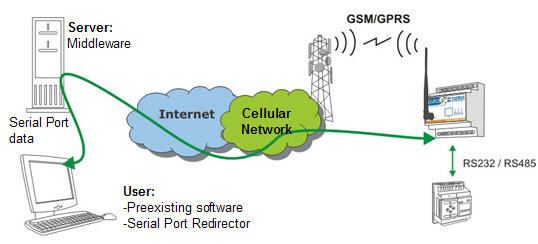
For this type of solution the procedure below must be followed:
If the protocol used by the serial port of the remote equipment is Modbus, the MW can be configured in a special mode that will allow the optimization of the queries.
The Middleware has the capability of sending the Modbus query received to a particular GRD depending on the ID of the Modbus slave of the received query.
This simplifies the communication between the user software and the Modbus slaves since they work as if the were connected to a unique Modbus network.
The master can establish the link using Modbus TCP, Modbus RTU or Modbus ASCII over TCP.
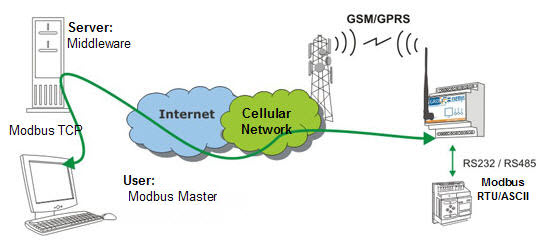
For this type of solution the procedure below must be followed:
The GRD can send SMS alarms to up to 8 recipients based on the value of its inputs.
You can also send and SMS to the GRD to ask for the value of a particular input/output or to activate an output.
This inputs/outputs can be physical or Modbus signals.
The SMS feature can be used together with GPRS solutions.
Script programming can also be used for customized solutions where the standard criteria to send SMS alarms is not enough.
For this type of solution the procedure below must be followed:
2022-03-17