

 |
If you connect the GRD/cLAN to the Exemys Telemetry Server you don't need to read this section |
We will see now how to configure the MW to operate with the serial port in a transparent mode.
User:John
Password: exemys
You want to communicate to the flow meter connected to the GRD/cLAN with ID 268 located in a water well.
GRD ID: 268
Password: well
MW data: (These parameters are configured in the MW connection)
TR port: 41000
We must have first the MW connected and the GRD/cLAN added as we saw in “Connection between GRDs and Middleware”.
In the MW we enter into “Configuration -> GRDs” and here we edit the equipment configuration in “Serial port mode” -> “TRANSPARENT”.
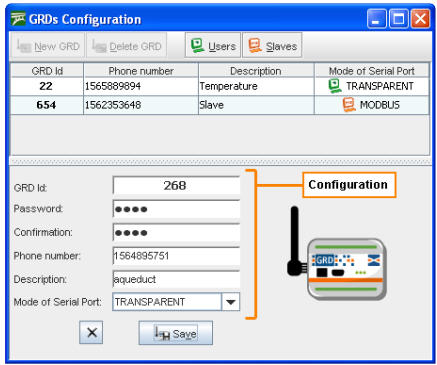
The Telephone and Description options are optional and not necessary. When we finish loading all necessary data we press the “Save” button to add the GRD/cLAN to the list.
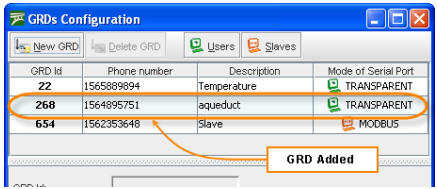
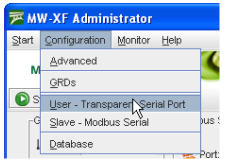
Then a user must be added who will have access to these GRD/cLAN. To access the User and permits screen for transparent mode go to “Configuration -> Users – Serial Transparent”.
The Users and transparent permits screen allows us to add or delete users and assign permits to the users for the GRD/cLAN you consider convenient. The GRD/cLAN that can be assigned are those with transparent operating mode.
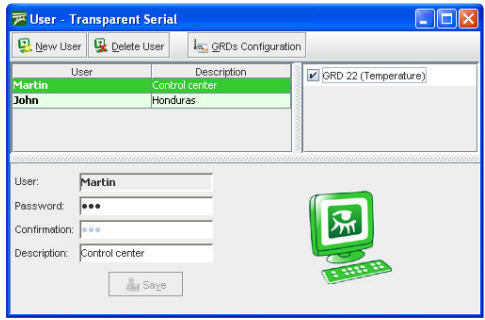
The configured user name and password are used for authentication of the port redirector. When a redirector connects to the MW it must indicate the user name and password.
2017-06-16