
The purpose of this manual is to provide the instructions to quickly and easily install and operate the ERD equipment.
The installation of the ERD also implies the installation of middleware and eventually any other application depending on the intended use for the system.
The ERD has multiple uses. These are the most common uses that will serve as a guide to read this manual.
This solution will let you visualize in a WEB page the values of the measured or obtained variables via MODBUS by the ERD and sent to Middleware, passing through the database.
The ERD can generate reports and/or historic records of the variables. This information is sent to the Middleware, which finally stores this information in a standard database (MySQL or MS SQL).
Finally, a website can be designed with standard tools to display this information on-line.
There are solutions, where storing the information onto a database is sufficient (without developing a website).
Note: The WEB Server and the database engine are not provided by Exemys. The Apache HTTP Server is free and is widely used in commercial applications. The same thing happens with the database engine.
There lots of types of sensors that can be contacted directly to the ERD inputs to measure different types of variables. Depending on the ERD model, sensors could be used to deliver signals in 0-10V, 4-20mA or pulses, or simply connect different devices to their inputs/outputs.
The ERD can also be configured as MODBUS master and queries can be made to different slaves to expand its inputs/outputs.
Each one of the queries can be associated to variables of the type supported by the ERD, depending on their characteristics (input, output, analog input or pulse input). This way, they obtain the same properties of report generation and/or historics as the physical ones have.
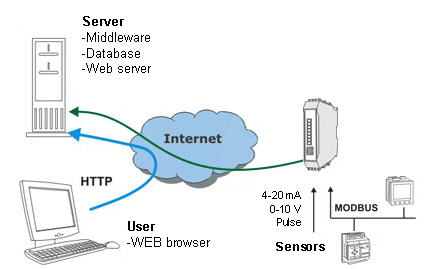
For this type of solution the following procedure must be followed:
In certain applications the user can make use of an existing SCADA software which he wants to use to present the new information from the SCADA.
Here we have two possible alternatives:
If you want to access a remote device with serial port from the SCADA see the section “Remote access to serial port – Modbus for serial port”.
This is a solution very similar to the one described in the previous section with the difference that in this case the SCADA will query the parameters to the database, this means that it must have the capability of capturing information from a database (MySQL or MS SQL).
Here, the Web Server and the Internet Browser are replaced by the SCADA.
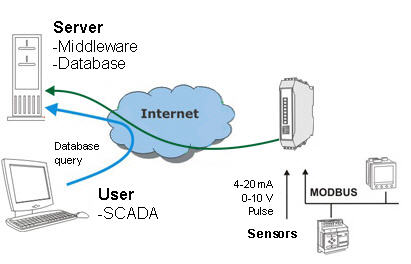
For this type of solution the procedure below must be followed:
Note: The database engine is not provided by Exemys. MySQL is a free database engine and is widely used in commercial applications.
This is another alternative that lets you read the value of the variables read by the ERD using the Modbus protocol, widely disseminated in the world of automation.
In this case the SCADA will make Modbus queries directly to Middleware, querying the “”Internal MODBUS slave of the MW”. This will respond as a Modbus slave that contains the value of inputs/outputs of the GRDs in registers of the Input Registers and Holding Registers type.
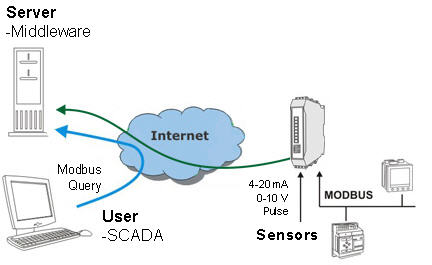
For this type of solution the procedure below must be followed:
This solution allows you to remotely Access the RS232 or RS485 serial port of a device as if it were physically connected to the serial port of our computer.
You can think of it as an alternative to the telephone modems but with several advantages.
We have again two variations:
To access the remote serial port you must install the “Redirector of serial port” software. This software creates a virtual serial port that lets you use an existing software and connect to the remote equipment as if it were connected in a physical serial port of the computer.
Middleware is here only a link between the Redirector of serial port and the ERD serial port.
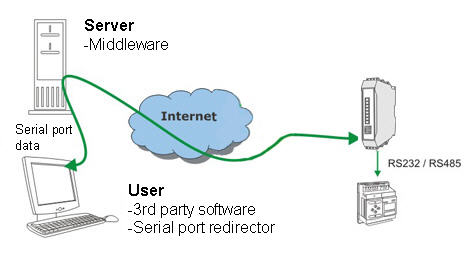
For this type of solution the procedure below must be followed:
If the protocol used by the serial port of the remote equipment is Modbus, the MW can be configured in a special mode that will allow the optimization of the queries.
The Middleware has the capability of sending the Modbus query received to a particular ERD depending on the ID of the Modbus slave of the received query.
This simplifies the communication between the user software and the Modbus slaves since they work as if the were connected to a unique Modbus network.
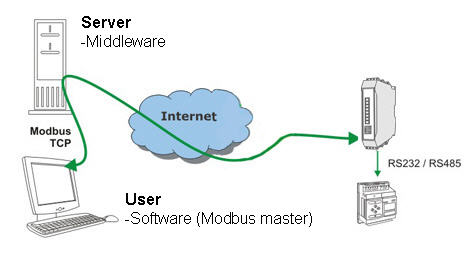
For this type of solution the procedure below must be followed: