

The wSerial functions as a point-multipoint wireless series that transmits data entered in the "Concentrator" to all the "Nodes" and the data entered in a "Node" only to the "Concentrator".
In this equipment, we can use different serial port setting on each side.
Next we will see the "Concentrator" and the "Node" configurations.
The data can be entered in the "Concentrator" through the port RS232/RS485 or USB and in the "Nodes" through the port RS232/RS485.
Concentrator Configuration:
Supposing the network is already formed and the "Nodes" devices are already linked as we saw in "Assembling the Network", we proceed to configure the serial port in the "Concentrator" as well as in the "Nodes".
In the serial port configuration, we will see 2 parameters that set the mode of transmission. One is the "End Character" and the other is "Time Window".
The End Character is a symbol ASCII of 1 to 255 which is used to define a data packet, meaning that the wSerial will store data in it’s buffer until the said character arrives.
The Time Window is how long we want the device to wait before sending the data that it has accumulated in case it does not continue receiving. It is in milliseconds.
If we disable the two end criteria of the packet, the shipment will occur when the internal buffer is full, which is 360 characters..
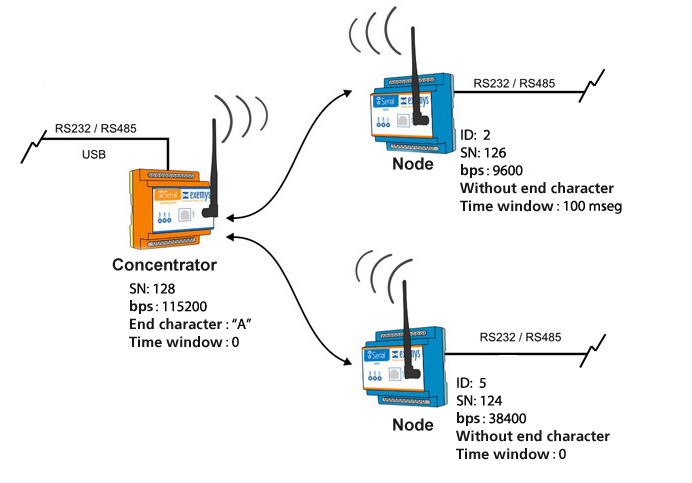
For example if we have:
Serial Number : 125
Connecting to a serial device that transmits data at 115200 baud, end character = "A" = 65, without time window.
Serial Number: 126
Connecting to a serial device that transmits data at 9600 baud, without end character, time window = 100 ms.
Serial Number: 124
Connecting to a serial device that transmits data at 38400 baud, without end character, without time window.
The topology of this example would be:
First we connect the "wSerial Config" to the "Concentrator" and configure the parameters of the serial port. We go to the "Serial Port" tab and as specified in the example, we put it at 115200 baud and with end character. Also we must keep in mind flow control, parity, etc.
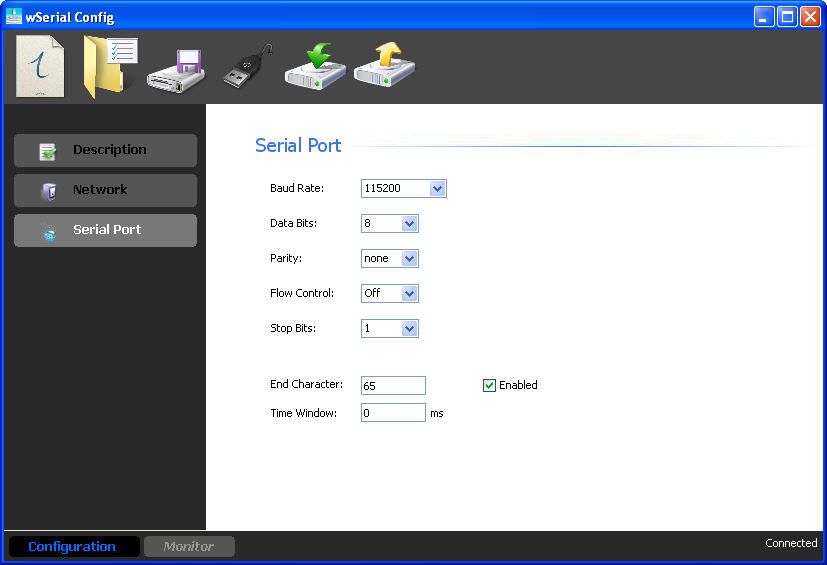
Finishing this, we send the configuration to the "Concentrator".
Nodes Configuration:
In the "Nodes" we have to configure the "Serial Port" tab according to what it requires. We can do this locally or remotely.

Once the "Concentrator" and the "Nodes" are configured, we can start to send data.