

The MW has the capability of connecting with a MySQL or SQL database. In doing so, it creates a schema and a database with the designated name in its respective configuration that in turn is made up of 3 tables where information is exchanged with the MW. Through these tables, you can get information on the status of ERDs inputs and outputs, you can also read historical values and you can also actuate on the outputs.
You have to bear in mind that there are 2 types of information that the ERD can send. On one side, the reports containing real values of inputs and outputs that are updated according to the criterion configured in the ERD, from which we can choose what we want to have updated and under which conditions, the values are updated only when there is a connection with the MW. On the other side, we keep historicals, consisting of records of events or by time (logs) that are stored in the ERD and sent to the MW. In case of not having a connection the records remain in the equipment until the recovery of the connection. For additional information see the ERD manual.
When loading the parameters of the connection with the database and the MW is started, the schema and tables are created automatically.
A detail of the tables with their different fields are detailed and in a separate appendix some queries are shown regarding the access to them.
The reports table stores the latest values sent by the ERD, as well as its status. When a new ERD is created, this is automatically added to the reports table and from then on the status is available through this means, it only remains to make the appropriate queries to know the desired parameters. There is an entry in the table for each ERD and the table being updated with the reports from that ERD. The date field in first instance takes the NULL value until the arrival of a consistent report.
Table name: "reports"
Field |
Description |
Condition |
Possible values |
grd_id |
ERD/GRD ID number |
- |
1 to 4000 |
state |
Shows the status of the connection |
Connected |
1 |
Disconnected |
0 |
||
i1 to i200 |
Status of digital inputs |
On |
1 |
Off |
0 |
||
o1 to o200 |
Status of digital outputs |
On |
1 |
Off |
0 |
||
an1 to an200 |
Value of analog inputs |
In 0-10V analog inputs with 2 digits |
0 to 1000 |
In 0-10V analog inputs with 3 digits |
0 to 10000 |
||
In 4-20mA analog inputs with 2 digits |
400 to 2000 |
||
In 4-20mA analog inputs with 3 digits |
4000 to 20000 |
||
MODBUS analog inputs |
-32768 to 32767
or |
||
p1 to p200 |
Values of the pulse inputs |
In pulse inputs |
0 to 1000000000 |
MODBUS pulse inputs |
-2147483648 to 2147483647 |
||
date |
Date of last report |
- |
Ex.: 2008-12-30 17:44:50 |
The historics table stores history reported by all the ERDs/GRDs. There are different types of historics, for example, by digital inputs, by digital outputs, by analog inputs and within these it could be by time or by change.
For more detail on historic types that can be reported, please refer to the ERD manual which shows details of each one and how to configure them.
The table containing the information has the following format.
Name of the Table: "historical"
Field |
Description |
Condition |
Possible values |
historical_id |
Historic number |
|
|
grd_id |
ERD/GRD ID number |
|
1 to 4000 |
register_type |
Type of record entered |
In digital inputs |
8 |
In digital outputs |
9 |
||
In analog inputs |
11 |
||
In pulse inputs |
12 |
||
timestamp |
Date of historic |
|
Ex.: 2008-12-30 17:44:50 |
address
|
Number of inputs or outputs |
In digital inputs |
1 to 200 |
In digital outputs |
1 to 200 |
||
In analog inputs |
1 to 200 |
||
In pulse inputs |
1 to 200 |
||
value |
Value of the report |
In digital inputs |
0 ó 1 |
In digital outputs |
0 ó 1 |
||
In 0-10v analog inputs with 2 digits |
0 to 1000 |
||
In 0-10v analog inputs with 3 digits |
0 to 10000 |
||
In 4-20mA analog inputs with 2 dígits |
400 to 2000 |
||
In 4-20mA analog inputs with 3 dígits |
4000 to 20000 |
||
In pulse inputs |
0 a 1000000000 |
||
MODBUS analog inputs |
-32768 to 32767 |
||
MODBUS pulse inputs |
-2147483648 to 2147483647 |
||
PT100 (-200 °C a 850 °C) analog inputs |
-2000 to 8500 |
||
historical_type |
Motive of historic |
Digital inputs |
NULL |
Digital outputs |
NULL |
||
Current temporary report of analog inputs |
1 |
||
Analog input below the minimum |
2 |
||
Analog input between minimum and maximum |
3 |
||
Analog input above the maximum |
4 |
||
Current minimum temporary report of analog inputs |
5 |
||
Current maximum temporary report of analog inputs |
6 |
||
Current average temporary report of analog inputs |
7 |
||
Pulse inputs |
NULL |
The write table is used to actuate on digital outputs of the ERD. By writing parameters on the database it is possible to enable or disable any of the equipment outputs.
The MW is continuously checking if any command has been written, if this is the case, it removes it from the database and takes action. If the entered data have errors, the parameters will be eliminated without taking any action.
Name of the table: "commands"
Field |
Description |
Possible values |
| command_id | Command number | |
grd_id |
ERD/GRD ID number | 1 a 4000 |
output_number |
Output number that wants to be modified | 1 a 200 |
state |
Status to be taken | 0 (Off) |
1 (On) |
||
date |
Current date (it can be ignored) | Ex: 2008-12-30 17:44:50 |
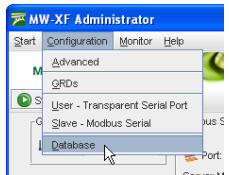
To access the database screen the MW must be stopped by pressing the Stop button on the main screen, we then go to Configuration -> Database.
The Database screen displays the database where historics, reports are stored and it accepts possible changes in the digital outputs.
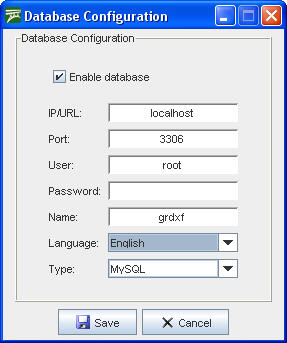
From here we can modify the configuration of the base, the IP address, the port, name and type of database (MySQL and SQL) containing the information and also configure the user and password so the MW can have access to the database.
|
The (MySQL o SQL) database must be created and the user configured for the MW must have read and write privileges enabled in the database. |
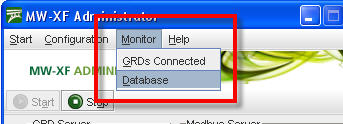
To determine the status of the database we can access the monitoring screen in Monitoring -> Database.
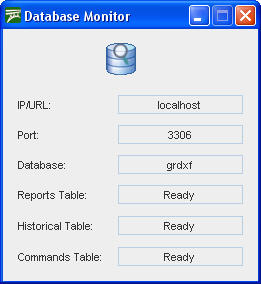
Database monitoring indicates the functioning of database tables and are presented in the following screen.
The IP address, the port and the name of the database must coincide with the data entered in the original configuration, then we find the three tables that make the database for the MW. If everything is working correctly, the three tables should indicate “Ready”, if this is not the case verify the IP address, the connection port, the user name and password; verify that the MySQL base is working and that the users have read and write privileges to access the database.
