Middleware (also called MW-XF or simply MW) is software that together with the ERDs constitutes a complete tool for the collection of remote data. The MW is basically a server with multiple connections that allows the collection of data from all existing ERDs in the field and dumps the information in different formats to be accessed in different ways.
The MW can be installed on any of these platforms: Windows 2000, 2003, 2008, XP, Vista, 7 and 8. Java Runtime Environment 1.6 or higher must be installed (available free in www.java.com).
To install follow the next steps:
Once the program is installed you will see in the Programs menu a folder called Exemys. Inside this folder you will find another one called MW-XF; this one contains the MW-XF Administrator icon.
If the Java Runtime Enviroment 1.6 or higher is not installed you will have problems in the installation. If this happens, uninstall the MW, install the Java Runtime Environment and install again the MW.
 |
In Windows you should have the option “Automatic change of time according to daylight savings time” disabled, in case of being in a region without daylight savings time, change the time zone to one zone that has it and disable it, then retake the time zone. |
In case of any other inconvenience during installation contact us at support@exemys.com
It is important to point out that the MW Works is a Windows service. This means that is a program that works even if no user is logged in and it does not have a graphical interface. To configure you must use the MW-XF Administrator program, installed together with the MW (or the MW-XF remote Administrator to do it from another computer).
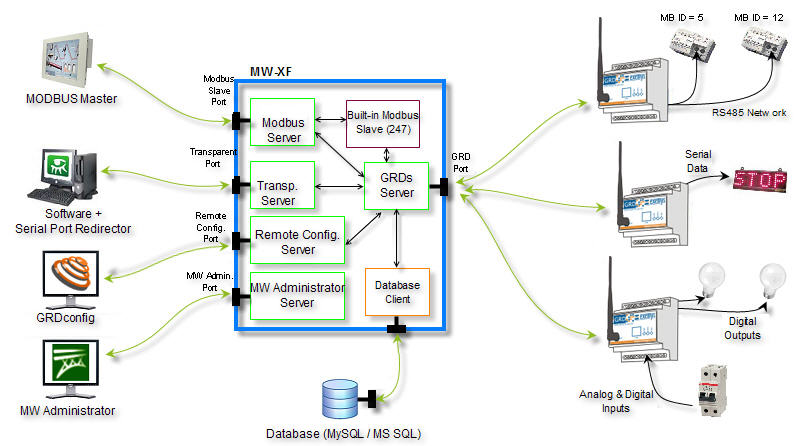
We now show an internal diagram of the MW-XF. We will be explaining its different parts as we advance in this manual.
To configure the Middleware start the MW-XF Administrator program.
The following screen will be displayed.
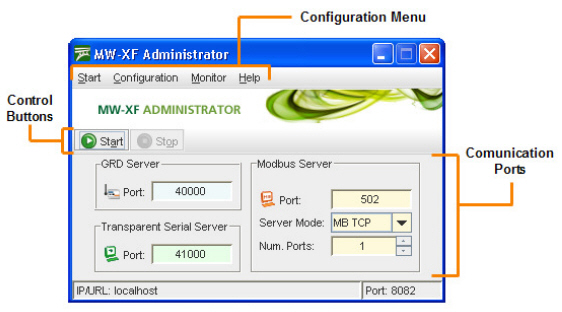
The Administrator main screen is divided into three parts:
In this section we will make a general comment about the use of TCP/P Ports. In the corresponding chapter we will discuss it in detail.
There are three more ports that generally are not modified but they are worth mentioning here:
To do this we only have to press the “Start”  button located in the MW main screen.
Once this is done, the MW is ready to receive the ERDs connections, Redirectors of serial port and Modbus Masters, and connect to the database (in case it is enabled and configured).
The Start and Stop  buttons do not stop the MW service, they only act on the MW servers.
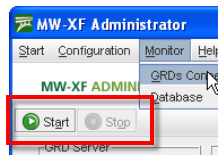
If when you press the start button it does not remain pressed as shown in the following figure, it may be that some of the TCP/IP ports used by the MW might be busy by some other service of your computer. Please contact support@exemys.com to get assistance on how to solve this problem.