

In this mode the wRemote concentrator behaves as a de-multiplexer Modbus, this means that it will derive serial Modbus queries that are made in the “Concentrator” and travel through the network to “Node” devices, and then returning the answers back to the “Concentrator”.
This mode has the advantage of being able to use protocols and distinct serial port speeds and baud rates on each side.
Then we will see the settings in the “Concentrator” and “Node”.
The Modbus Master can be connected to the “Concentrator” by RS232 / RS485 ports or USB and slaves can be connected to the “Nodes” using RS232 / RS485 ports.
Concentrator Configuration:
Assuming the network formed and the “Node” devices linked as we saw in “Assembling the Network”, proceed to configure in the “Concentrator” with “wRemote Config”. The destination of Modbus queries that arrive by the serial port are done in the following way:
For example if we have:
Serial Number: 125
Connected to the Master MODBUS that performs queries in mode Modbus ASCII at 115200 baud.
Serial Number: 126
Connected to the MODBUS slave that operates in Modbus ASCII at 9600 baud, Slave = 45
Serial Number: 124
Connected 2 MODBUS slaves that operate in Modbus RTU at 38400 baud, Slave = 1 and Slave = 20
The topology of this example would be as follows:

As we saw earlier each “Node” has an “ID” number that is used to relate the query. First we must identify that the “ID” are connected slaves, we do this in the image above:
The “Node” with serial number 126 has the “ID” 5, and we know that it is connected with slave 45
The “Node” with serial number 124 has the “ID” 2, and we know that it is connected with slaves 1 and 20
First we connect with the “wRemote Config” to the “Concentrator” and configure the serial port parameters. Go to the tab “Serial Port”, as specified in the example we place it in Modbus mode ASCII at 115200 baud, we must also take into account flow control, parity, etc…
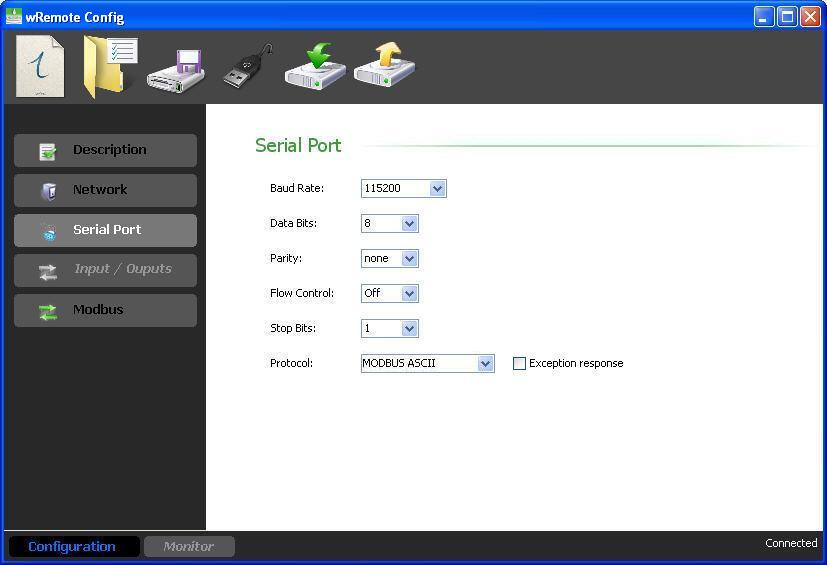
As we can see in the image, we have the “Exception Response” option; this enables or disables the response with exceptions from the “Concentrator” and can be helpful to us in the following case:
If the “Concentrator” is in a RS485 bus with parallel slaves and queries an ID that is not its own and neither is connected remotely but is of a slave that is in the bus, the wRemote will respond as an exception or not depending on how this option is configured. Obviously in this case we disable it to avoid a conflict in communication.
After that we go to the tab “Modbus” where we configured the derivation of individual “ID” queries that are connected slaves.
To do this select the “ID” in the left column and then the slaves in the “slaves” table on the right.
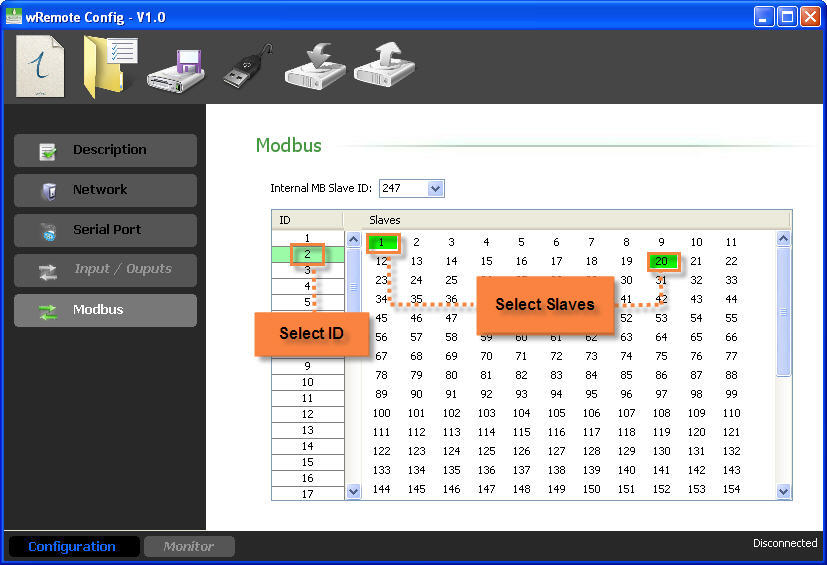
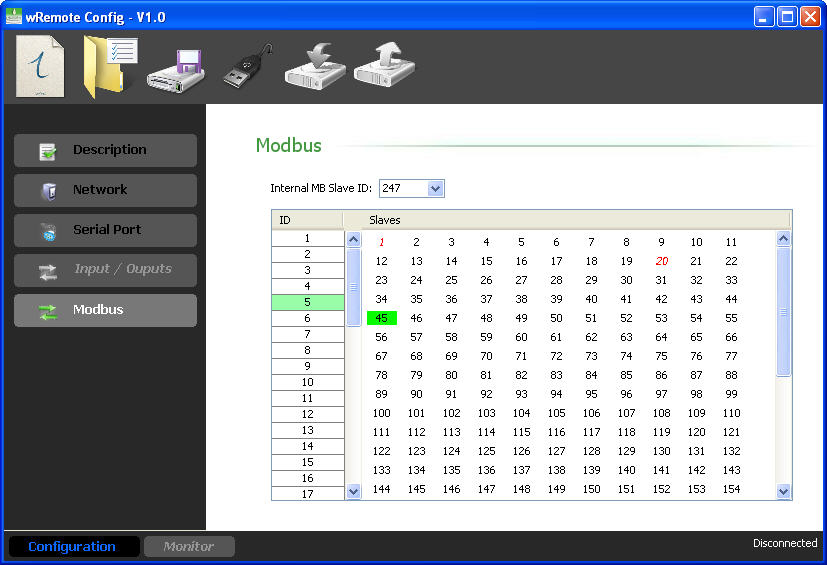
As we see the ID 5, we assign it slave 45 and for ID 2 we assign slaves 1 and 20. So any queries that reach RS232 / RS485 or the USB ports of the “Concentrator” and is intended for slave 45 is transmitted to wRemote “Node” with the ID 5 and if they are intended for slave 1 or 20, they will be routed to ID 2.
When finished we send the configuration to the “Concentrator”
Configuration of the Nodes:
In the “Nodes”, we only have to configure the tab “Serial Port” as required by the slaves. We can do this both locally and remotely.
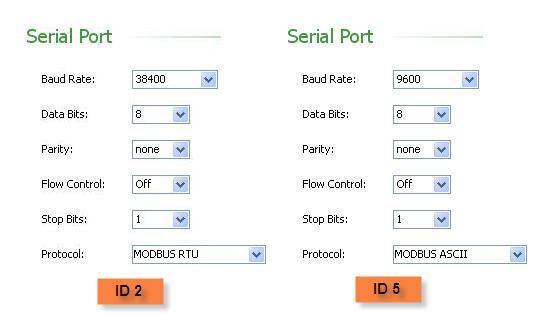
nce configured, the “Concentrator” and “Nodes” can begin to perform queries.
|
The maximum length of a MODBUS query for HOLDING REGISTERS or INPUT REGISTERS is 37 records. |
